Button Pin Canva Frame Template: Design Assets Simplified
Creating custom merchandise, whether for a small business, a local event, or a personal project, often feels like a bottleneck in the creative process. You might have a brilliant concept for a logo design or a specific illustration, but translating that into a print-ready format for physical products usually requires advanced software skills. This is where the Button Pin Canva Frame Template changes the game. It acts as a bridge between your raw creative ideas and a polished, professional final product. By providing a pre-structured environment inside a platform you likely already use, it removes the technical barriers that typically slow down production.
Understanding the Digital Asset
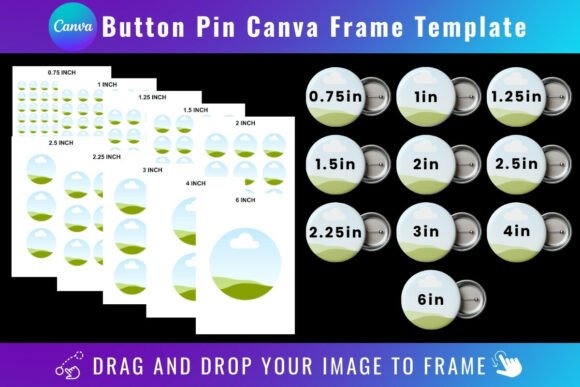
At its core, the Button Pin Canva Frame Template is a digital asset designed to streamline your workflow. When you receive the product, you get a PDF containing a direct link to Canva. Clicking that link opens a custom set of templates in your editor. Visually, these frames are precise, circular cut-lines designed to standard button sizes. They function as placeholders. The "personality" of this asset is purely functional and clean; it is built to ensure that your artwork, whether it is a complex piece of modern typography or a simple icon, fits perfectly within the manufacturing constraints of a physical button.
The appeal lies in its simplicity. You are not downloading a complex software plugin or a massive file that clogs your hard drive. Instead, you are accessing a ready-made workspace. The style is minimal by design because the focus needs to be on your content, not the frame itself. Whether you are working on social media graphics to mock up your products or preparing the actual files for printing, the template ensures consistency. It removes the guesswork regarding bleed areas and safe zones, which are critical in packaging design and print production.
Practical Applications for Creators and Businesses
The versatility of the Button Pin Canva Frame Template extends across numerous industries. For entrepreneurs and small business owners, this is an essential piece of design infrastructure. If you are launching a merchandise line, you need to produce assets quickly. You can use these frames to test how your brand identity translates to physical goods. Perhaps you have a specific sans serif font for your headers and a script font for your tagline; placing them inside the frame helps you visualize the hierarchy and readability before you commit to a bulk order of pins.
For content creators and bloggers, these templates are perfect for creating mockups. You can drag and drop a background image—perhaps a texture that evokes a vintage serif font aesthetic or a clean background for a handwritten font—into the frame. This allows you to generate high-quality previews for your audience. Instead of just talking about your new design, you can show exactly how it will look. This level of professionalism boosts audience engagement and builds trust.
Graphic designers will find this particularly useful for client work. Often, a client requests a logo design that needs to work across multiple mediums. A logo that looks great on a website header might look too cluttered on a 2-inch button. Using the Button Pin Canva Frame Template allows you to adapt the design. You might need to simplify a complex display font or adjust the kerning to ensure legibility at a small scale. This is a practical step in the design process that ensures the brand identity remains strong across all physical touchpoints.
Integration with Modern Typography and Design
Typography is the backbone of effective design, and these frames help you apply modern typography principles to three-dimensional objects. When working with a premium font or a creative font that has unique ligatures, you need to ensure the details aren't lost in the circular crop. The template allows you to experiment with font pairing. For example, you might pair a bold, blocky display font with a delicate sans serif font for the sub-text.
The frame helps you evaluate the "color" of the text—the overall density and texture created by the letterforms. If you are using a heavy serif font, it might dominate the small canvas, whereas a light sans serif font might get lost. By using the drag-and-drop feature, you can rapidly iterate. This is where the asset shines in editorial design and marketing contexts. You can create a series of buttons for a campaign, each featuring a different font pairing to see which resonates best with the target demographic.
Technical Requirements and Workflow Tips
To get the most out of this tool, it is important to understand the technical specifications. First, a free Canva account is required to access and edit the templates. This accessibility is a major advantage, as it allows hobbyists and students to produce professional results without a subscription to expensive industry-standard software.
However, there is a specific requirement regarding transparency. If you want to download the design with a transparent background—which is often necessary for printing on colored paper or fabric—you will need a Canva Pro account or higher. If you are using a free account, you can still design within the frame, but your export will have a solid background, which may limit some printing options.
It is also vital to note what this product is not. This is a digital product; no physical frames are delivered. Furthermore, these templates are exclusively for the Canva platform. They are not compatible with SVG editing software, nor can they be used directly with Cricut or Silhouette cutting machines. While you can design the artwork in Canva, you would need to export the final image and import it into your cutting machine’s software separately if you are doing DIY manufacturing at home.
Recommendations for Best Results
When using the Button Pin Canva Frame Template, keep these practical tips in mind to ensure high-quality output:
- Image Resolution: Always upload high-resolution PNG or JPG background images. Even though the button is small, low-quality source files will result in pixelation.
- Visual Hierarchy: Use the frame to test your visual hierarchy. Ensure the most critical information is in the center, where the curvature of the button is least likely to distort it.
- Contrast: If you are using a handwritten font or a thin script font, ensure there is high contrast between the text and the background. Readability is paramount in branding.
- Testing: Do not settle on the first draft. Use the template to create three or four variations. Test a version with a serif font and one with a sans serif font to see which aligns better with the project's tone.
Ultimately, the Button Pin Canva Frame Template is about efficiency and empowerment. It allows you to take control of your design assets, ensuring that your brand identity is consistent and professional, whether it appears on a digital screen or a physical pin on a lapel. It is a small tool that solves a specific problem, but for those in the merchandising and branding space, that solution is invaluable.