Celebrate the Class of 2027 with Custom Graduate Frames
Graduation season is approaching, and for the Class of 2027, the anticipation is already building. Whether you are a parent preparing announcements, a designer creating party invitations, or a small business owner offering personalized memorabilia, the visual presentation of this milestone is just as important as the event itself. We often spend hours searching for the perfect background or the right font pairing, only to find that the tools available are either too rigid or too complex for a quick turnaround.
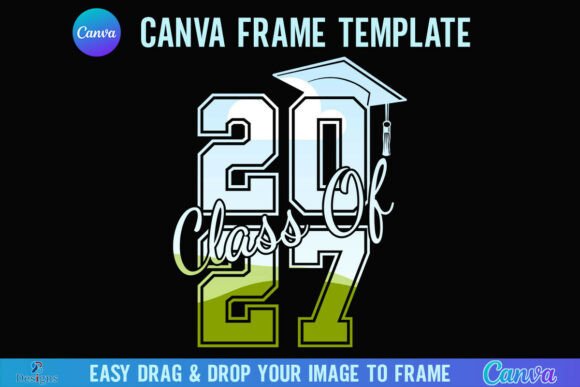
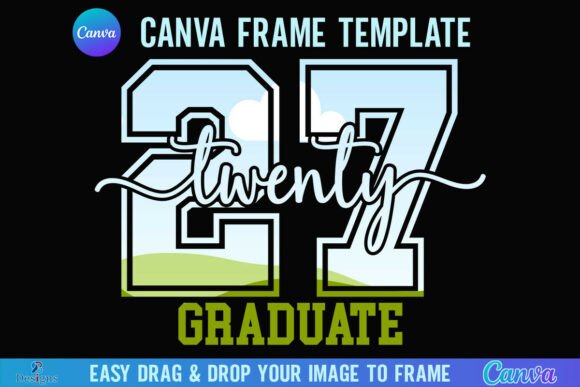
Enter the Class of 2027 Graduate Canva Frame. This is not just a static image; it is a dynamic design asset built specifically for the modern creative workflow. If you have ever struggled with cropping photos to fit a specific shape or layering elements in complex software, this solution simplifies the process significantly. It is designed to bridge the gap between professional quality and user-friendly editing, ensuring that your final product looks polished and ready for print or digital distribution.
Understanding the Canva Frame Workflow
One of the most common friction points in digital design is the file setup. When you purchase this asset, you receive a single ZIP file. Upon unzipping, you will find a PDF file containing a direct link. Clicking this link takes you straight into the Canva editor where the template is hosted. This approach removes the need to download massive files or import complex layers manually. It respects the reality that many creators—from marketers to hobbyists—rely on cloud-based tools for speed and accessibility.
The template itself is set to a generous 4000x4000 px paper size. In the world of design, resolution is king. This square format is versatile enough for social media posts, large format prints, or standard photo inserts. The high pixel count ensures that your Class of 2027 Graduate Canva Frame remains crisp and clear, whether it is viewed on a high-definition screen or printed as a keepsake. It provides the canvas you need to ensure that the graduation photos inside the frame look their absolute best.
Seamless Integration with Your Photos
The core functionality of this product revolves around the "drag and drop" mechanic. You do not need to be a graphic design expert to use it. If you have a PNG or JPG image of the graduate, you simply drag it into the frame template within Canva. The frame is designed to contain the image perfectly, maintaining the composition without awkward stretching or cropping. This is particularly useful for social media graphics, where a consistent, professional look is necessary to stand out in a crowded feed.
However, it is important to note the technical requirements. You will need a FREE Canva account to access and edit the template. This is a low barrier to entry for most users. But, if your goal is to download the final design with a transparent background—a feature often required for layering the frame over other textures or using it in packaging design—you will need a Canva Pro version or higher. This distinction is vital for professional designers who need to integrate this asset into larger, more complex brand identity systems.
Creative Applications Beyond the Announcement
While the primary use case is clearly for graduation photos, the utility of a high-quality frame extends further. As a small business owner, you might use this frame for a "Meet the Team" series featuring new interns or associates. For content creators, it serves as a visual metaphor for "framing the future" in motivational content. The modern typography and design elements inherent in the frame can influence the mood of your project, lending it a sense of celebration and achievement.
Consider the visual hierarchy of your project. A well-designed frame acts as a border that draws the eye inward. It creates a defined boundary between the subject (the graduate) and the background environment. This is a fundamental principle in editorial design and web design. By using the Class of 2027 Graduate Canva Frame, you are essentially pre-building that hierarchy. The viewer’s attention is immediately directed to the photo, making your message—whether it is "Congratulations" or "Welcome to the Team"—instantly more impactful.
Technical Considerations and Limitations
It is equally important to understand what this product is not. This is a digital product; no physical frames will be shipped. It is a Canva Frame Template file only. It is not an SVG file, which means it is not suitable for use with Cricut Design Space or Silhouette cutting machines. If your goal is to create a physical cut-out from vinyl or cardstock using a die-cutting machine, this specific file format will not work for that purpose.
This limitation actually highlights the product's strength: it is optimized for digital and print media, not physical cutting. For logo design mockups, digital invitations, or website headers, the Canva format is superior because it allows for rapid editing and color changes. You can match the frame’s colors to your specific brand identity palette directly within the Canva editor, ensuring consistency across all your marketing materials.
Maximizing the Value of Your Design Asset
When working with design assets like the Class of 2027 Graduate Canva Frame, efficiency is the ultimate goal. Think about the time you would spend trying to build a similar frame from scratch—aligning shapes, choosing fonts, and ensuring the masking works correctly. This template provides a professional baseline. It allows you to focus on the personalization aspect: the specific photo, the specific message, and the specific context of the graduate.
For those in the print-on-demand space or running an Etsy shop, this asset can be a time-saver. Imagine creating a mockup for a graduation party invitation. Instead of photographing a physical mockup, you can use this digital frame to present the design concept to a client. It allows for quick revisions and a professional presentation style that builds client confidence.
Final Thoughts on the 2027 Graduate Frame
The Class of 2027 Graduate Canva Frame is a practical tool for a specific, celebratory moment. It combines the accessibility of Canva with the high-resolution requirements of professional design. By understanding its capabilities—such as the drag-and-drop ease and the 4000px resolution—and its limitations—such as the lack of SVG compatibility for cutting machines—you can integrate it effectively into your creative toolkit.
Whether you are a blogger documenting your child’s journey, a marketer creating internal communications, or a hobbyist making scrapbooks for family, this frame provides a solid foundation. It removes the technical hurdles of design, allowing you to focus on the celebration of the Class of 2027 and the memories you are preserving.